WA CRM runs inside WhatsApp Web. Sort every conversation into stages, send personalized messages to one contact or to thousands at a safe pace, and see what is working.
No new app to open or learn. The Kanban button appears in your sidebar.
Your chats stay on your device
Contacts and messages live in your browser, not on our servers.
Built-in sending limits
A hard cap of 5 messages per minute, with random pauses.
Why WA CRM
WhatsApp is great for talking. It is hard to sell with.
Once you have more than a handful of conversations, things start to slip.
Chats get buried
A new customer writes, ten more messages arrive, and the first one is gone from the screen. Nobody knows who is waiting for a reply.
Follow-ups live in your memory
Quotes, payments and "I will think about it" sit in your head or a notebook, so some of them are never answered.
Writing to many is slow and risky
Pasting the same message into each chat takes hours, and sending too fast is the quickest way to get a number restricted.
What you get
More replies, fewer lost customers
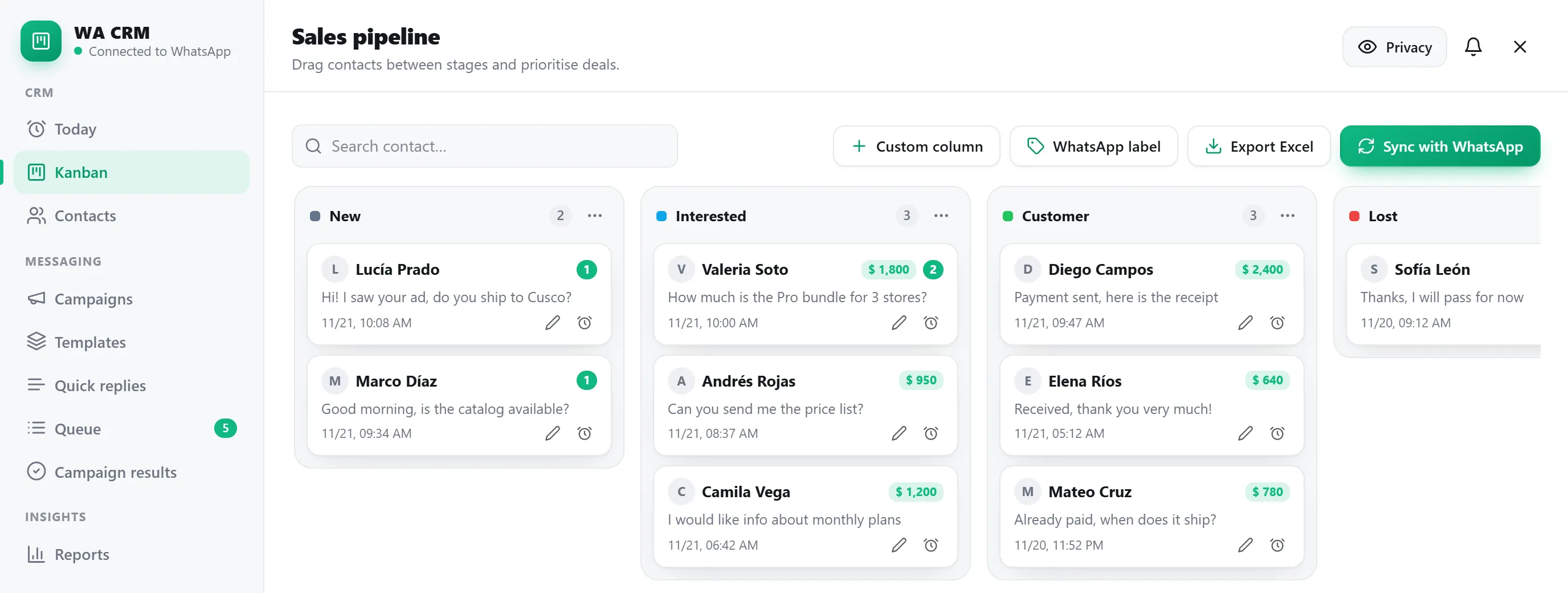
See every deal at a glance
Each conversation is a card in a stage: New, Interested, Customer, Lost, or your own.
Follow up on time
Set a reminder on any contact and get it in the bell, so a quote never goes cold.
Reach many people in minutes
Build one message and send it to a list, a label, a group or an Excel file, each with their own name.
Let rules sort the chats
Keywords such as "price" or "payment sent" move a chat to the right stage. Add AI if you want it.
Stay inside safe limits
A built-in queue sends at a human pace and stops when something goes wrong, to protect your number.
Know what works
Sends per day, delivery rate, who replied to each campaign, pipeline value and how many contacts sit in each stage.
The product
Your WhatsApp sales in one panel
Everything below is part of the extension. These are real screens with sample data.
Drag chats through your stages
Create your own columns or use your WhatsApp Business labels. Every incoming message creates or updates a card, and rules or optional AI move it to the right stage.
Your own columns or WhatsApp Business labels
Drag a card and the real label changes
Notes, deal value, probability and reminders on every card
web.whatsapp.com
Every contact in one table
Find anyone in seconds and act on them from the same row.
Filter by label, stage, groups or unread
Send, tag, edit, set a reminder or open the chat from each row
Import and export Excel and CSV files
web.whatsapp.com
Messages made of blocks
Combine text, images, video, documents, voice notes and links in one message, personalize it for each person and preview it like a chat before you send.
Text, image, video, document, voice note and link blocks
A pause between blocks and {{name}} variables
Audience from contacts, labels, groups or Excel files
web.whatsapp.com
A queue that protects your number
Every send goes through one queue that you can watch, pause and resume.
5 messages per minute at most, with random pauses
Pause, resume and retry errors
Daily cap, a long pause every 20 sends and a stop on repeated errors
web.whatsapp.com
See what is working
Numbers you can act on, without building a spreadsheet.
Sends per day and delivery rate
Contacts by stage and pipeline value
Conversations still waiting for a reply
web.whatsapp.com
Classify chats automatically
Stop sorting by hand. Rules work on every new message, and AI is there if you want a second opinion.
Keywords move chats to a stage
Optional AI with your own Claude, ChatGPT, Gemini or DeepSeek key
Works on every new incoming message
web.whatsapp.com
Messaging
Send the right message to anyone
Reply to one contact in two clicks, or send a campaign to thousands. Every message is built from simple blocks.
Everything you can send
TextMessages with line breaks and variables.
ImagesWith a caption, from a file or a link.
VideosWith a caption, from a file or a link.
DocumentsPDFs, spreadsheets and any other file.
Voice notesRecord them in the panel or upload an audio file.
LinksA link with a short text in front of it.
Personalized, every time
Use a variable for any column of your contacts or your Excel file. Each person receives their own version.
You write
Hi {{name}}, your order is ready for pickup today.
user receives
Hi user, your order is ready for pickup today.
Reach people your way
To one contact
Send from the contacts table or a card without leaving the panel, and optionally ask your AI for a suggested reply.
To many contacts
Pick contacts, type numbers, choose a WhatsApp label or a group, or upload an Excel or CSV file.
Block by block
Add a pause between the blocks of a message so it reads like a person wrote it.
From templates
Save the messages you repeat and load them in one click.
Everything included
Every plan includes every feature
The only difference between plans is how many WhatsApp numbers you can link.
Pipeline
Kanban board with your own stages
Your WhatsApp Business labels as columns
Cards created and updated by every incoming message
Notes, deal value, probability, email and company on each contact
Reminders with a notification bell
A Today view: reminders due, chats waiting for a reply and chats you have not answered
Export the board to Excel
Contacts
One table with filters by label, stage, groups and unread
Edit labels and details from the table
Open any chat in one click
Import and export Excel and CSV files
A default country code for local numbers
Messaging
Text, images, videos, documents, voice notes and links
Variables from any column
Preview as a chat before sending
Reusable templates and quick replies with variables
Schedule a campaign for later (Chrome and WhatsApp Web must be open)
Campaigns to contacts, numbers, labels, groups or Excel files
Optional AI suggested replies
Control and safety
Send queue with progress, pause and retry
Hard cap of 5 messages per minute with random pauses
Daily cap and a longer pause every 20 sends
Automatic stop after repeated errors
Each number checked on WhatsApp before sending
Contacts who write STOP are marked and left out of campaigns
Backup and restore of your data
Insights and automation
Reports: sends, delivery rate, pipeline value and stages
Campaign results: who received it, who replied and the reply rate
Contacts who reply move to the stage you choose
Export reports and campaign results to Excel
Industry packs for real estate, clinics, schools and shops, plus Spanish keywords
Keyword rules that move chats automatically
Optional AI classification with your own key
Spanish and English interface
Who it is for
Built for people who sell on WhatsApp
Online shops
Answer catalog questions, confirm payments, move buyers to Customer and tell everyone who is waiting that their order is ready.
Freelancers and consultants
Keep every proposal in a stage, note the deal value and remind yourself when to follow up.
Agencies and multi-brand teams
Link several numbers, one per brand or client, and keep each pipeline in order.
Clinics, schools and services
Remind the people who asked for it about appointments, classes or renewals, with their name in every message.
How it works
Ready in a few minutes
Create your account
Sign in with your email, no password. Your 3-day free trial starts right away.
Link your numbers
Add the WhatsApp numbers you work with. Your plan sets how many.
Install the extension
Open WhatsApp Web and the Kanban button appears in the sidebar.
Pay with PayPal when the trial ends. Cancel any time.
Before and after
The same day, with and without WA CRM
Comparison of common tasks with and without WA CRM
Task
Without WA CRM
With WA CRM
Knowing who to reply to next
Scroll the chat list and guess
Open the board: new chats and unread badges are in front of you
Sending one message to your whole list
Copy and paste, one chat at a time
One message, one queue, sent at a safe pace
Using each customer's name
Type it by hand every time
A {{name}} variable fills it in
Following up on quotes
Rely on memory or a notebook
A reminder rings in the panel
Counting open deals
Guess, or build a spreadsheet
Reports show stages and pipeline value
Protecting your number
Hope you do not send too fast
Hard limits that cannot be raised
Safe sending
Safe sending, by design
Limits that protect your number are part of the product and cannot be switched off.
These limits lower the risk; they do not remove it. WhatsApp bans mostly follow reports and blocks from people who did not expect your message. Only write to contacts who agreed to hear from you. For sending at large scale, the official WhatsApp Business API is the right tool.
At most 5 messages per minute. This limit cannot be raised.
Random pauses that only make the wait longer, never shorter.
A daily cap you control and a longer pause every 20 sends.
The queue stops after 3 errors in a row.
Every number is checked on WhatsApp before sending.
After a reload the queue never starts by itself.
Privacy
Your data stays with you
Contacts, chats and cards are stored in your browser. We keep only your account email, your plan and your linked numbers (as a one-way fingerprint plus the first three and last four digits). AI classification is optional and talks directly to the provider you choose, with your own key.
Kanban pipeline with your own stages or WhatsApp labels
Text, images, video, documents and voice notes
Campaigns to contacts, labels, groups or Excel files
Personalization with variables and reusable templates
Send queue with built-in safety limits
Reminders, notes and deal values
Reports, campaign results with reply tracking and keyword rules
Today view, quick replies, scheduled campaigns and STOP handling
Optional AI with your own key
Excel and CSV import and export, backup
Every new account starts with a free trial
3 days with 1 WhatsApp number. No card needed. When it ends, the extension locks until you subscribe, and your data is kept.
Payments with PayPal. Cancel any time. Refund within 3 days of a payment.
FAQ
Questions, answered
What is a WhatsApp CRM?
A WhatsApp CRM is a tool that organizes your WhatsApp conversations like a sales pipeline: every chat becomes a card in a stage (new, interested, customer, lost), with notes, deal value and reminders, so no lead is forgotten. WA CRM does this inside WhatsApp Web.
How do I use WhatsApp as a CRM?
Install the WA CRM extension in Chrome, open WhatsApp Web and press the Kanban button in the sidebar. Your chats appear as cards you can drag between stages, tag, set reminders on and send campaigns to, without leaving WhatsApp.
Is there a CRM for WhatsApp Web as a Chrome extension?
Yes. WA CRM is a Chrome extension that adds a Kanban CRM, contacts table, message campaigns, a send queue and reports directly to WhatsApp Web. You install it from the Chrome Web Store and try it free for 3 days.
Can I send bulk WhatsApp messages with it?
Yes. Build one message with text, images, video, documents or voice notes, personalize it with the name of each contact and send it to a list, a label, a group or an Excel file. Sending goes through a queue with a hard cap of 5 messages per minute and random pauses to lower the risk of restrictions, which cannot be ruled out.
Is this an official WhatsApp product?
No. WA CRM is independent software that works through WhatsApp Web in your browser. It is not affiliated with, endorsed by or sponsored by WhatsApp or Meta. Because it is unofficial, WhatsApp can change things that affect it, and using automation carries a risk of restrictions on your number.
How long does setup take?
A few minutes: create your account, install the extension, open WhatsApp Web and sign in with the same email.
Can I try everything before paying?
Yes. The 3-day free trial includes every feature with 1 WhatsApp number, and it needs no card.
Do I need WhatsApp Business?
No. It works with a regular WhatsApp account. If you use WhatsApp Business, your labels can be used as pipeline stages.
What can I send, and to whom?
Text, images, videos, documents, voice notes and links, to one contact or to many: your contacts, numbers you type or upload, a WhatsApp label or a group. WhatsApp is stricter with people who do not have you saved, so only write to people who expect your message.
Where is my data stored?
In your browser. Contacts, chats and cards never go to our servers. See the privacy policy for what we do keep.
What counts as a number?
Each WhatsApp phone number you connect to your account. You can use a linked number from several computers. Your plan sets how many numbers you can link, and you can swap a number up to twice a month.
Can I use several WhatsApp numbers?
Yes. Pro lets you link 3 numbers and Plus lets you link 10 numbers, and you use WA CRM on each of them.
How does the trial work?
Create an account and you get 3 days with 1 number, no card needed. When it ends the extension locks until you subscribe. Your data is kept.
How do I pay and cancel?
Payments go through PayPal. You can cancel any time from your account and keep access until the end of the period you paid for.
Can I get a refund?
Yes, within 3 days of a payment. After that, payments are not refundable.
Which browsers work?
Google Chrome and other Chromium-based browsers that run Chrome extensions.
Will my number be banned?
We cannot promise that. WhatsApp decides, and it mostly acts on reports and blocks. WA CRM adds strict limits and checks to lower the risk, but you should only message people who agreed to hear from you.